Mix Console, Signal Flow & Channel Strips
Channel strip zones, input routing, reorderable 8-slot processing racks, Subgroup Buses, Aux Sends and Returns, Master Bus controls, and precision fader and knob operation.
The Cave Recorder Mix Console (CMD + 1 on macOS, CTRL + 1 on Windows and Linux) models an in-line large-format studio recording and mixing desk. Every input channel, subgroup bus, stereo auxiliary return, and master bus stage is visible on a single dark-chassis surface without hidden routing matrices or nested sub-menus.
This chapter details the end-to-end audio signal path from physical preamplifiers to disk stems and main monitors, the seven functional zones of an Input Track channel strip, the architecture of Subgroup Buses, Aux Returns, and the Master Bus, and the mouse and keyboard modifiers used for precision console mixing.
4.1 Console Architecture & End-to-End Signal Flow#
Understanding where audio is tapped for multitrack disk capture versus monitor and bus mixing is fundamental to operating Cave Recorder with confidence during live band tracking.
+====================================================================+
|             CAVE RECORDER END-TO-END CONSOLE SIGNAL FLOW           |
+====================================================================+
  PHYSICAL AUDIO INPUT (IN 01 .. IN 18)
         |
         v
  [Input Trim (TRM: -24.0 to +24.0 dB)] -> [Polarity Invert (Ø: 180°)]
         |
         v
  [Sub-Sample Phase Align (Φ: 0.00 to +50.00 ms / 0 to 50,000 us)]
         |
         +-------------------------------+
         | (Armed [R] + Record)          | (When Input Mon [I] is OFF)
         v                               v
  +=============================+ +==================================+
  | RAW PRE-FADER STEM RECORDER | | DISK PASS LANE PLAYBACK READER   |
  | <Take>/rec/..._Rec001.wav   | | Active Pass: PASS 01 or OD 02..N |
  | (Pre-inserts & pre-fader!)  | | (See Chapter 6 for Pass Comping) |
  +=============================+ +==================================+
         +---------------+---------------+
                         | <-- AUX TAP: [PRE] (Pre-Insert / Pre-Fader)
                         v
  +==================================================================+
  | 8-SLOT REORDERABLE CHANNEL PROCESSING RACK (Slots 1..8 + TAPE)   |
  |  * Input TAPE Saturation (DRV, WRM, BIAS, HC, OUT, MIX)          |
  |  * 12-Band Parametric EQ (2:12B EQ) <-- AUX TAP: [EQ] (Post-EQ)  |
  |  * Analog VCA Compressor (3:VCA CMP) & CLAP Plugins (1..8:CLAP)  |
  |  * Movable Aux Send Tap Slot (4:AUX SND)                         |
  +==================================================================+
                         |
                         v
  [Channel Fader (-inf to +12.0 dB), Pan (PAN) & Mute/Solo (M/S)]
         |
         +---------------+---------------+--> AUX TAP: [PST] (Default)
         | (OUT: SUB 1 / SUB 2 / MST)    | (Aux Send Bus Summing)
         v                               v
  +=============================+ +==================================+
  | STEREO SUBGROUPS (SUB 1..16)| | STEREO AUXILIARY RETURNS         |
  | DRUM BUS, INST BUS          | | * AUX 1 REVERB (EMT 140 Plate)   |
  |  * Trim (TRM), LINK & SEL   | |   LC, Pre-Delay (PD), Decay (DCY)|
  |  * 8-Slot SUB RACK & Sends  | | * AUX 2 TAPE DLY (Capstan Echo)  |
  |  * Balance (BAL), M/S, Fader| |   WOW, DMP, Time (TM), FB, PP    |
  +=============================+ +==================================+
         +---------------+---------------+
                         | (Summing into Master Bus)
                         v
  +==================================================================+
  | STEREO MASTER BUS (MST MASTER BUS)                               |
  |  1. Master Tape (TAPE: DRIVE 0.0..+24.0 dB, WARM 0..100%)        |
  |  2. Master Bus Glue Compressor (COMP: Shared Threshold THR)      |
  |  3. Brickwall Limiter (LIM: THR -48..0 dB, CEIL -6.0..0.0 dB)    |
  |  4. Master Fader (-inf..+12.0 dB), Mute (M) & 40-Segment Meter   |
  +==================================================================+
         | (Main Monitor Outputs 1/2)    | (When [2-TRK] Enabled)
         v                               v
  [STUDIO CONTROL ROOM MONITORS]  [CONCURRENT LIVE STEREO PRINT WAV]
                                  (Plus [FLAC]/[MP3] + [BOUNCE] -> _Mixes/)
4.1.1 Dual-Path Capture: Raw Pre-Insert Stems Plus Live Processed Prints#
In traditional rehearsal spaces and project studios, engineers face a dilemma when tracking a full band:
- The Safe But Uninspiring Approach: Record flat tracks with zero processing so nothing can be ruined by an overly aggressive compressor or EQ setting, leaving the band with dry, unmixed rough bounces at the end of the night.
- The Inspiring But Risky Approach: Print heavy compression, EQ, and tape saturation directly onto the multitrack stems, risking permanent distortion or pumping if a guitarist boosts a pedal mid-song.
Cave Recorder resolves this dilemma through a split capture topology:
- Raw Pre-Fader Multitrack Stems (
<TakeFolder>/rec/): Every armed Input Track (R) writes its 32-bit floating-point WAV file (Rec001Base Pass orRec002-ODOverdub Pass) immediately after Input Trim (TRM), Polarity (Ø), and Phase Alignment (Φ), before the 8-slot insert rack and channel fader. You can dial in aggressive 8:1 drum compression, heavy tape drive, high-pass filters, or experimental CLAP plugins on the console during rehearsal knowing the underlying multitrack stem on disk remains 100% clean and unclipped. - Concurrent Live Stereo Master Print (
<TakeFolder>/mix/): Simultaneously, while the transport is recording aTake, the Master Bus (2-TRKenabled) captures the complete post-fader, post-subgroup, post-reverb, and post-limiter stereo mix in real time to aPrint<NNN>WAV file with automatic Plugin Delay Compensation (PDC) latency trimming. SelectingFLACand/orMP3and clickingBOUNCEon the Master Bus renders a 24-bit.flacmix file, a 320 kbps CBR.mp3mix file, or both simultaneously and links them into the Project's_Mixes/folder for immediate band sharing and cloud sync, while you retain every raw multitrack stem for later remixing or offline stem bouncing (covered in Chapter 7: Session Reel, Mixdowns, Snapshots, Disk Layout & Cloud Sync).
4.2 Input Track Channel Strips (Zone by Zone)#
Cave Recorder supports up to 18 Input Track channel strips (CH01 through CH18) alongside Subgroup Buses, Aux Returns, and the Master Bus. Each Input Track strip is organized vertically from top to bottom in strict signal-flow order.
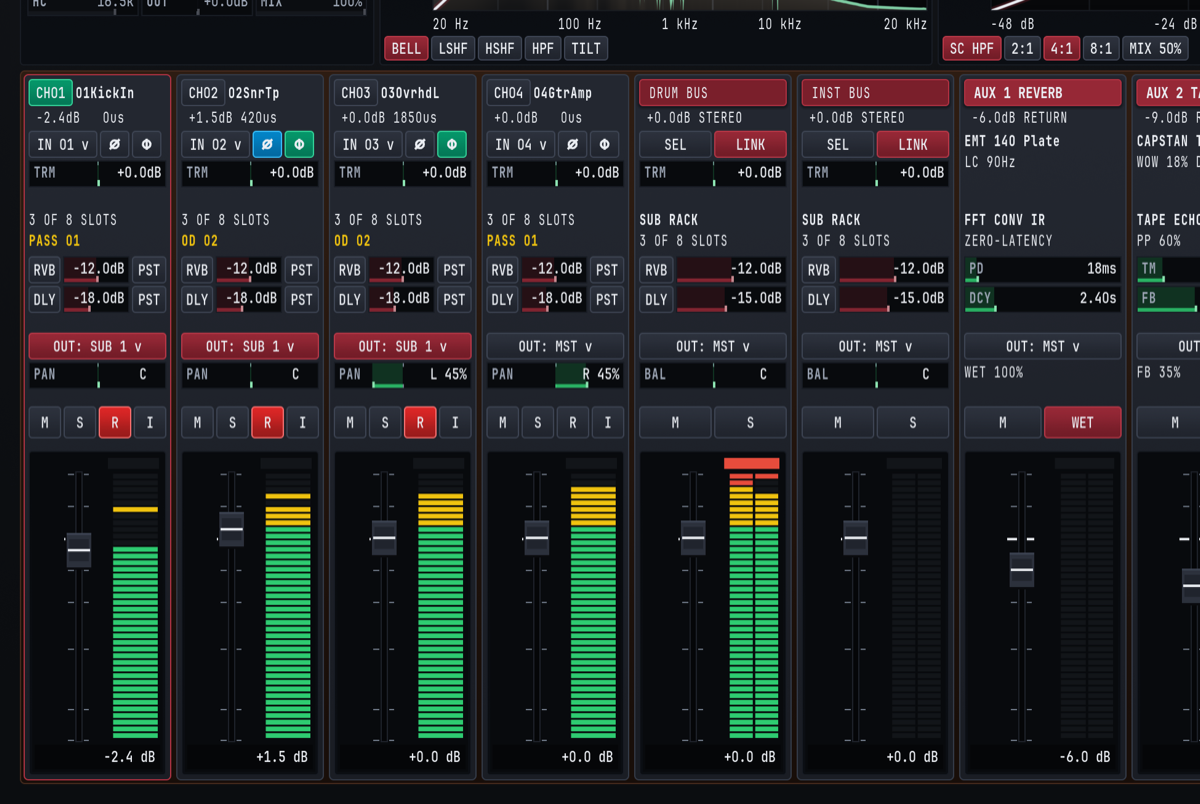
4.2.1 Input Track Control Reference Table#
| Strip Zone | UI Control / Badge | Range / States | Default | Primary Studio Function |
|---|---|---|---|---|
| 1. Header | CH01 .. CH18 Badge & Nameplate |
Custom text label (e.g., 01KickIn) |
CHNN |
Identifies channel number and scribble-strip name. Clicking selects the strip for inspection. |
| 1. Header | Level & Delay Readout | -inf..+12.0dB, 0us..50000us |
+0.0dB 0us |
Displays current fader setting and active sub-sample phase delay offset in microseconds (us). |
| 2. Input & Phase | Physical Input (IN 01 v) |
IN 01..IN 18, NONE (PLAYBACK) |
IN NN |
Assigns physical hardware audio input channel or sets the strip to pure disk playback. |
| 2. Input & Phase | Polarity Invert (Ø) |
Off / Active (cyan, SHIFT + P) | Off | Flips signal polarity by 180° on the inspected strip to correct underside snare mics or inverted cables. |
| 2. Input & Phase | Phase Align (Φ) |
Off (dark) / Active (emerald) | Off | Engages sub-sample acoustic delay compensation (0.00 ms to +50.00 ms) calculated by ALIGN ALL. |
| 2. Input & Phase | Input Trim (TRM) |
-24.0 dB to +24.0 dB |
+0.0 dB |
Adjusts pre-insert digital input gain before disk stem capture and the 8-slot rack. |
| 3. Rack & Pass | Rack Slot Summary | 0 OF 8 SLOTS .. 8 OF 8 SLOTS |
3 OF 8 SLOTS |
Shows active processor count in the channel's 8-slot insert rack. |
| 3. Rack & Pass | Active Pass Badge | PASS 01, OD 02, OD 03.. |
PASS 01 |
Displays which Pass Lane is currently selected for playback inside the active Take. |
| 4. Aux Sends | Reverb Send (RVB) |
-inf (-60.0 dB) to +12.0 dB |
-12.0 dB |
Controls send level from this channel to the stereo AUX 1 REVERB bus. |
| 4. Aux Sends | Delay Send (DLY) |
-inf (-60.0 dB) to +12.0 dB |
-18.0 dB |
Controls send level from this channel to the stereo AUX 2 TAPE DLY bus. |
| 4. Aux Sends | Send Tap Selector | PRE / EQ / PST |
PST |
Selects pre-insert (PRE), post-EQ/pre-fader (EQ), or post-fader (PST) send pickoff point. |
| 5. Routing & Pan | Output Bus (OUT: ... v) |
SUB 1..SUB 16, MST |
OUT: MST v |
Routes post-fader channel output to one or more Subgroup Buses and/or the Master Bus. |
| 5. Routing & Pan | Stereo Pan (PAN) |
L 100% .. C .. R 100% |
C (Center) |
Positions the channel across the stereo field using a constant-power panning taper. |
| 6. Switch Bank | Mute (M) |
Off / Muted (SHIFT + M) | Off | Silences post-fader channel audio and PST aux sends without stopping pre-fader recording. |
| 6. Switch Bank | Solo (S) |
Off / Soloed (SHIFT + S) | Off | Isolates soloed channels in the control room monitor path without affecting multitrack recording. |
| 6. Switch Bank | Record Arm (R) |
Unarmed / Armed (red, SHIFT + A) | Armed on active inputs | Arms the channel for disk stem capture and rolling 30-minute retroactive memory capture. |
| 6. Switch Bank | Input Monitor (I) |
Auto Playback / Live Input (SHIFT + I) | Off | Forces live physical input monitoring through the channel strip even during transport playback. |
| 7. Fader & Meter | Channel Fader & 40-Seg Meter | -inf (-60.0 dB) to +12.0 dB |
+0.0 dB |
Controls post-insert mix level alongside a 40-segment Peak/RMS bargraph with peak hold. |
4.2.2 Zone 1 & Zone 2: Track Header, Input Routing, Polarity, Phase & Trim#
At the top of each Input Track strip (CH01 through CH18), the Track Header displays the channel badge (CH01 highlighted in emerald when selected) and the custom scribble-strip name (01KickIn, 02SnrTp, 03OvrhdL, 04GtrAmp). A crimson outline borders the entire selected channel strip to show at a glance which track is currently loaded into the four Upper Console Wells (on the Mix Console view, CMD/CTRL + 1) and the full-screen CHANNEL INSPECTOR view (CMD/CTRL + 3). Immediately beneath the track name, a compact dual telemetry line reports the current fader gain and the sub-sample phase delay offset in microseconds (such as -2.4dB 0us on CH01, +1.5dB 420us on CH02, and +0.0dB 1850us on CH03).
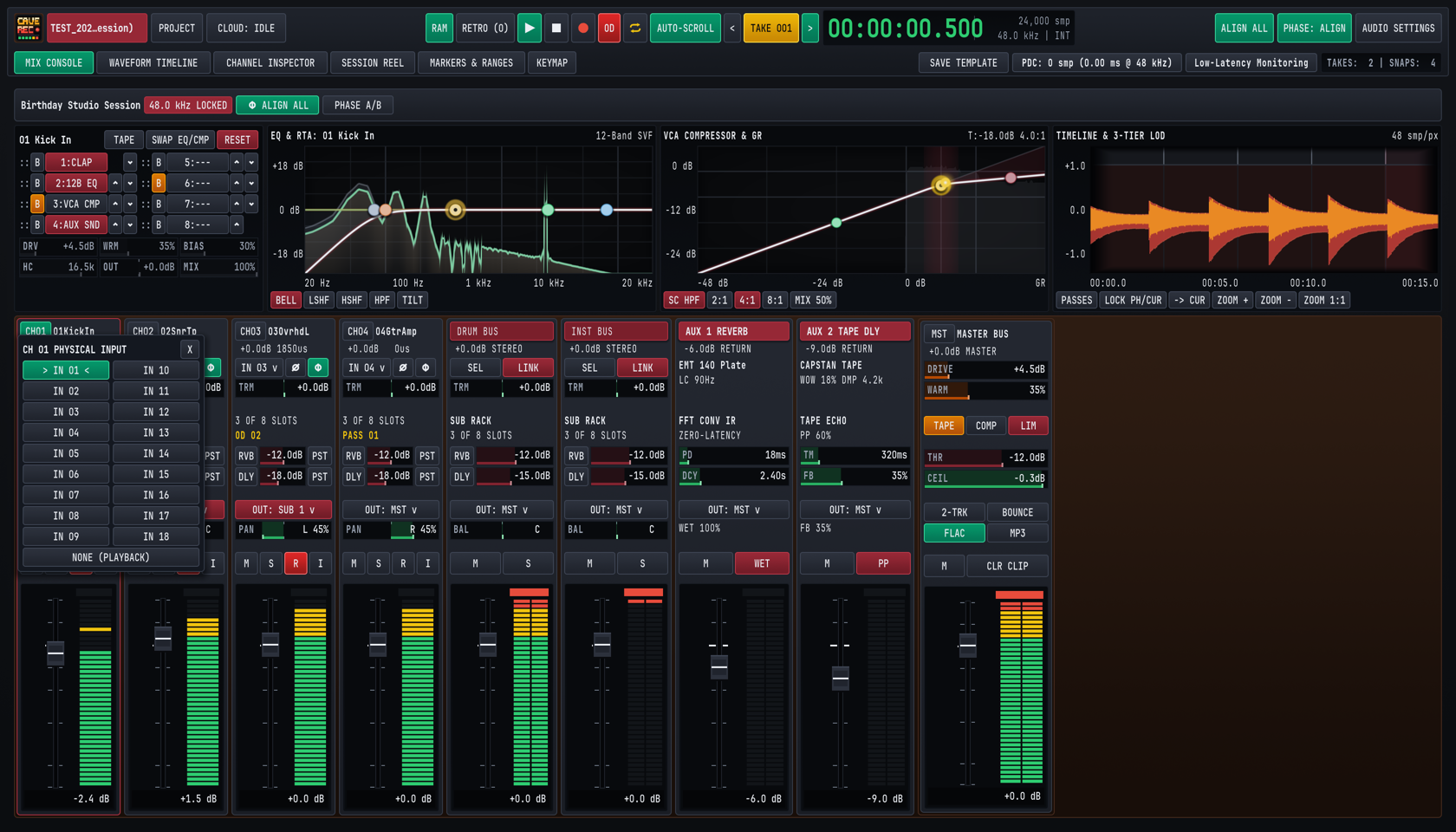
Clicking the Physical Input Selector (IN 01 v) opens the CH NN PHYSICAL INPUT popover menu, allowing you to bind the channel strip to any physical hardware input (IN 01 through IN 18) on your connected USB, Thunderbolt, or ADAT audio interface, or select NONE (PLAYBACK) for dedicated mixdown or virtual instrument return tracks.
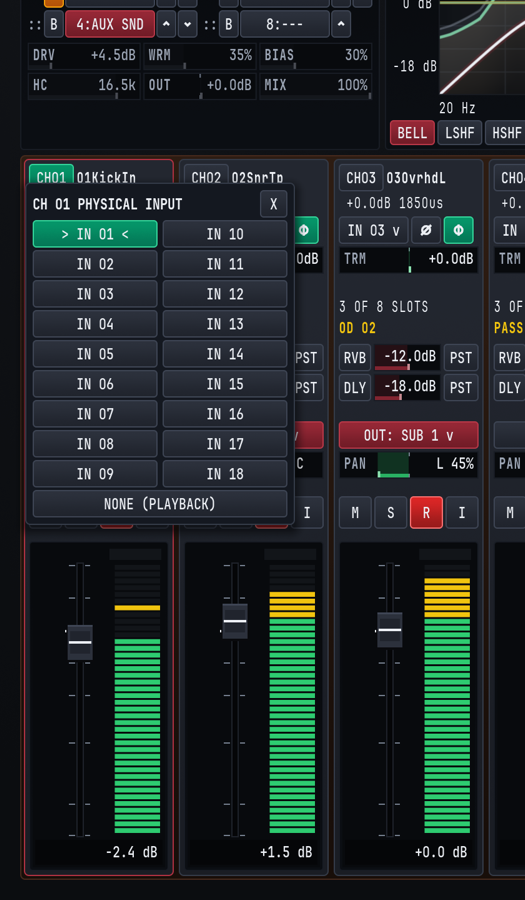
Directly to the right of the input dropdown sit two phase-conditioning switches:
Ø(Polarity Invert, SHIFT + P on the inspected strip): Reverses the positive and negative waveform excursions by180°. It illuminates cyan when active (for example, onCH02 02SnrTpwhen phase-aligning a snare microphone against overheads or a bottom snare mic).Φ(Sub-Sample Phase Alignment): Illuminates emerald when automatic or manual multi-mic time alignment is active on the channel, applying a positive delay between0.00 msand+50.00 ms(0 usto50,000 us) as shown in the header telemetry line. See Chapter 5: Built-In Processors, Phase Alignment & CLAP Plugins for the complete multi-mic alignment workflow.
Below the input and phase row, the horizontal Input Trim (TRM) bar adjusts pre-insert gain from -24.0 dB to +24.0 dB around a center 0.0 dB detent. Use TRM to normalize hot or quiet microphone preamplifiers so that raw stems hit disk around -18 dBFS to -12 dBFS RMS with generous headroom before entering the 8-slot processing rack.
4.2.3 Zone 3 & Zone 4: Insert Rack Summary, Active Pass Badge & Aux Sends#
Zone 3 provides instant status feedback for both insert processing and track-level Pass selection:
N OF 8 SLOTS: Reports how many of the channel's eight reorderable processor slots are currently populated (for example,3 OF 8 SLOTSwhen12B EQ,VCA CMP, andAUX SNDare active).- Active Pass Badge (
PASS 01/OD 02): Displays in gold which track-level Pass is currently active inside the loaded Session Take.PASS 01indicates the originalRec001Base Pass captured when theTakebegan at00:00:00.000, whileOD 02,OD 03, and higher indicate subsequent track-level Overdub Passes (Rec002-OD,Rec003-OD) recorded inside that sameTake.
Zone 4 houses the two stereo Auxiliary Sends:
RVB(Aux 1 Reverb Send): Feeds the console's stereo convolution reverb processor (AUX 1 REVERB), adjustable from-inf(-60.0 dB) to+12.0 dBby dragging horizontally across the crimson send bar.DLY(Aux 2 Tape Delay Send): Feeds the console's stereo capstan tape echo processor (AUX 2 TAPE DLY), adjustable from-inf(-60.0 dB) to+12.0 dB.- 3-Way Send Tap Selector (
PRE/EQ/PST): Clicking the tap button to the right of either send cycles through three pickoff points in the channel signal path:PRE(Pre-Insert / Pre-Fader): Taps the signal immediately afterTRM,Ø, andΦ, unaffected by channel EQ, compression, fader moves, or channel Mute (M). Ideal for feeding a dedicated musician headphone cue mix.EQ(Post-EQ / Pre-Fader): Taps the signal immediately after the12B EQslot (so low-cut filters and resonant notch cuts clean up the send) but before the VCA compressor and channel fader.PST(Post-Fader, Default): Taps the signal after the channel insert rack, fader, and Mute switch so that riding the channel fader up or down naturally scales its wet reverb and delay contribution in proportion.
4.2.4 Zone 5, Zone 6 & Zone 7: Output Routing, Switch Bank, Fader & 40-Segment Meter#
Zone 5 controls where the channel's post-fader stereo image is summed:
- Output Bus Selector (
OUT: SUB 1 v,OUT: SUB 2 v,OUT: MST v): Assigns the channel to a stereo Subgroup Bus (illuminated in crimson when routed to a Subgroup such asOUT: SUB 1 vforDRUM BUS) or directly to the stereo Master Bus (OUT: MST v). In the expandedCHANNEL INSPECTORview (CMD/CTRL + 3), clicking the Output Bus selector opens the multi-bus routing popover, where a single track or subgroup can route to multiple Subgroup Buses and the Master Bus simultaneously for parallel bus processing. - Stereo Pan Bar (
PAN): Positions the signal between left (L 100%), center (C), and right (R 100%) using a studio-3.0 dBconstant-power panning law so a signal panned hard left or right maintains the same perceived loudness as when centered.
Zone 6 provides the four primary console switches (M, S, R, I). All four switches can be clicked directly on any strip or toggled via SHIFT shortcuts on the currently inspected channel (leaving unmodified single keys free for global transport and marker actions):
M(Mute, SHIFT + M on inspected strip): Silences the post-fader output andPSTaux sends. Unmodified M drops a cue marker on the timeline without muting audio, and muting a channel on the Mix Console never interrupts pre-fader multitrack stem recording on an armed track.S(Solo, SHIFT + S on inspected strip): Engages Solo-in-Place on the monitor bus so you can inspect an individual microphone or subgroup in stereo context while keeping multitrack recording untouched.R(Record Arm, illuminates red, SHIFT + A on inspected track): Arms the track for multitrack WAV capture when transport Record (R) is engaged, and includes the channel in the rolling 30-minute retroactive memory capture (RAM/RETRO, triggered via SHIFT + R). Even when software Input Monitoring (I) is off, any record-armed track (R) continuously feeds live physical input signal to its 40-segment LED meter and the Dual-Trace Pre/Post-EQ RTA so you can verify preamp headroom and spectral balance during zero-latency hardware direct-monitoring sessions without doubling the monitor signal in the headphones.I(Input Monitor, SHIFT + I on inspected track): Switches the channel strip's audible monitor source between automatic disk playback of the active Pass Lane (PASS 01/OD 02) and live audible monitoring of the physical hardware input (IN 01..IN 18) through the channel's insert rack and fader. EnableIwhen rehearsing parts through console effects or checking microphone placement while playing back an existingTake.
Zone 7 contains the Logarithmic Studio Fader and 40-Segment Peak/RMS Meter:
- Fader Cap, Scale & Direct Numeric Entry: Provides smooth logarithmic resolution around the
0.0 dBunity gain mark, ranging from+12.0 dBdown to-inf(-60.0 dB), with a dedicated numeric dB readout at the bottom of the meter well (-2.4 dB,+1.5 dB,+0.0 dB). Clicking the numeric dB readout below any fader opens an inline text entry box where you can type an exact decibel value (such as-3.5or0) and press ENTER. - 40-Segment LED Bargraph: Combines instantaneous digital sample peak detection (including a floating yellow peak-hold segment and red
0.0 dBFSoverload latch) with continuous RMS loudness ballistics:- Emerald Segments (
-48 dBto-12 dB): Nominal tracking and mixing operating zone. - Amber Segments (
-12 dBto-3 dB): Healthy transient peak zone. - Red Cap (
-3 dBto0.0 dBFS): Digital full-scale peak warning. ClickCLR CLIPon the Master Bus or in the Channel Inspector (or press X in the Channel Inspector) to clear latched clip indicators.
- Emerald Segments (
4.3 Subgroup Buses, Aux Returns & Master Bus#
To the right of the Input Track strips sit the console's stereo summing and return strips: Subgroup Buses (DRUM BUS, INST BUS, expandable up to 16 stereo subgroups), two dedicated Stereo Aux Returns (AUX 1 REVERB and AUX 2 TAPE DLY), and the Master Bus (MST MASTER BUS).
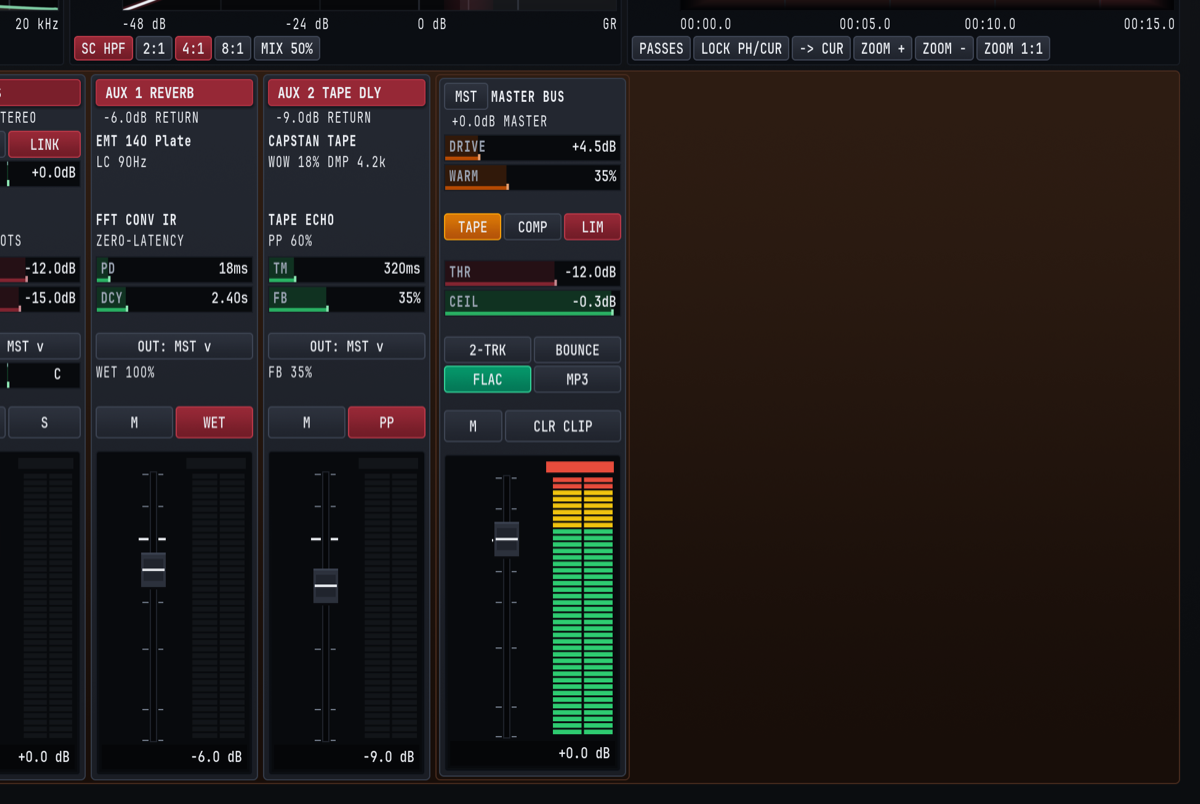
4.3.1 Stereo Subgroup Buses (DRUM BUS / SUB 1, INST BUS / SUB 2 .. SUB 16)#
Subgroup Buses let you sum related Input Tracks (such as all drum microphones into DRUM BUS, or guitars and keys into INST BUS) so you can process the entire group through a shared 8-slot insert rack and control its overall level with a single stereo fader.
Each Subgroup Bus strip provides:
- Crimson Bus Header & Stereo Readout: Displays the custom bus name (
DRUM BUS,INST BUS) and current stereo fader gain (+0.0dB STEREO). SEL(Select Bus for Inspection): ClickingSELloads the Subgroup Bus into the four Upper Console Wells (CMD/CTRL + 1) and theCHANNEL INSPECTORview (CMD/CTRL + 3). Every Cave Recorder Subgroup Bus owns a full 8-Slot ReorderableSUB RACKwith its own Tape Saturation stage, 12-Band Parametric EQ with Dual-Trace RTA, Analog VCA Bus Compressor, and CLAP plugin slots.LINK(Stereo Dynamics & Gain Link): Illuminates crimson when enabled, locking left and right detector sidechains and gain stages across the stereo bus so off-center floor tom or guitar hits never skew the stereo center image.- Subgroup Trim (
TRM,-24.0 dBto+24.0 dB): Gain-stages the summed multi-channel signal before it enters the Subgroup's 8-slotSUB RACK. If summing eight hot drum tracks drives the subgroup bus compressor too hard, pull backTRMonDRUM BUSrather than disturbing your individual drum fader balance. SUB RACKStatus (3 OF 8 SLOTS): Indicates how many processors are active in the subgroup's insert rack.- Subgroup Aux Sends (
RVB&DLY): Sends the entire post-rack subgroup mix toAUX 1 REVERB(default-12.0 dB) orAUX 2 TAPE DLY(default-15.0 dB, range-infto+12.0 dB) to place a whole drum kit or horn section into the same acoustic room. - Output Bus Selector (
OUT: MST v) & Stereo Balance (BAL): Routes the subgroup to theMASTER BUS(or cascades into downstream higher-numbered subgroups via the multi-bus routing popover in the Channel Inspector) and adjusts left/right stereo balance (L 100%..C..R 100%). - Bus Mute (
M), Solo (S), Fader (-infto+12.0 dB) & 40-Segment Meter: Controls final subgroup level and solo isolation. Soloing a Subgroup Bus automatically solos its contributing post-fader input channels in the monitor path.
4.3.2 Dedicated Stereo Aux Returns (AUX 1 REVERB & AUX 2 TAPE DLY)#
Cave Recorder includes two hardwired, zero-latency stereo effect return strips so you never have to sacrifice Input Track slots or configure third-party plugins just to set up studio plate reverb and tape slapback during a session:
| Return Strip | Header & Engine Readouts | Interactive Strip Drag Bars | Strip Switches & Routing |
|---|---|---|---|
AUX 1 REVERB |
EMT 140 Plate impulse response name, LC 90Hz input low-cut readout (20 Hz to 1000 Hz), and FFT CONV IR / ZERO-LATENCY engine status. |
PD (Pre-Delay): 0 ms to 200 ms (e.g., 18ms). DCY (Decay Time): 0.20 s to 12.00 s (e.g., 2.40s), dynamically rebuilding and swapping the stereo plate impulse response in real time. |
OUT: MST v routing, WET 100% readout, Mute (M), WET button (toggles 100% full wet vs. 50% blend), Return Fader (-6.0 dB), and 40-segment meter. |
AUX 2 TAPE DLY |
CAPSTAN TAPE model header, WOW 18% DMP 4.2k modulation and high-cut damping readout (500 Hz to 20.0 kHz), and TAPE ECHO / PP 60% width status. |
TM (Delay Time): 1 ms to 2000 ms (e.g., 320ms). FB (Feedback): 0% to 95% strip drag bar (98% engine max, e.g., 35%). |
OUT: MST v routing, FB 35% readout, Mute (M), PP Ping-Pong stereo bounce button, Return Fader (-9.0 dB), and 40-segment meter. |
For complete acoustic modeling details and studio tuning recipes for AUX 1 REVERB and AUX 2 TAPE DLY, see Section 5.5 in Chapter 5.
4.3.3 The Stereo Master Bus (MST MASTER BUS)#
The rightmost strip on the Mix Console is the Master Bus (MST MASTER BUS), which sums all Subgroup Buses, direct Input Tracks, and Stereo Aux Returns into the final stereo program bus feeding your control room monitors and the concurrent Live Stereo Print Recorder.
+-------------------------------------------------------------------+
|                   MST MASTER BUS PROCESSING CHAIN                 |
+-------------------------------------------------------------------+
  Summed Stereo Bus (Subgroups + Direct Tracks + Aux Returns)
         |
         v
  [1] MASTER TAPE SATURATION ([TAPE] Toggle, Amber when Active)
      * DRIVE: 0.0 dB to +24.0 dB (default +4.5 dB)
      * WARM:  0% to 100% harmonic density (default 35%)
         |
         v
  [2] MASTER BUS GLUE COMPRESSOR ([COMP] Toggle)
      * Stereo VCA bus compression controlled by THR (-48.0..0.0 dB)
         |
         v
  [3] LOOKAHEAD BRICKWALL LIMITER ([LIM] Toggle, Crimson when Active)
      * THR (Threshold): -48.0 dB to 0.0 dB (default -12.0 dB)
      * CEIL (True-Peak Ceiling): -6.0 dB to 0.0 dB (default -0.3 dB)
         |
         v
  [4] MASTER FADER (-inf to +12.0 dB) & MASTER MUTE ([M])
         |
         +---> Main Hardware Monitor Outputs (Channels 1 & 2)
         +---> [2-TRK] Live Stereo Print WAV + [FLAC]/[MP3] + [BOUNCE]
Every control on the MST MASTER BUS strip is designed for immediate tactile operation during tracking and mixing:
DRIVE&WARMDrag Bars: Adjust the input drive (0.0 dBto+24.0 dB, shown at+4.5dB) and analog transformer/oxide warmth (0%to100%, shown at35%) of the Master Tape stage.TAPE,COMP&LIMProcessor Toggles: Independently engage or bypass the Master Tape stage (TAPE, amber), Master Bus Glue VCA Compressor (COMP), and Lookahead Brickwall Limiter (LIM, crimson).THR(Threshold) &CEIL(Brickwall Ceiling) Drag Bars:THR(-48.0 dBto0.0 dB, default-12.0dB) sets the compression and limiting threshold, whileCEIL(-6.0 dBto0.0 dB, default-0.3dB) locks the absolute digital output ceiling so live rehearsalPrintfiles and offlineMixdownrenders never clip inter-sample converter reconstructions.2-TRK(Live 2-Track Print Toggle): When enabled, every transportRecordpass automatically records the post-Master-Bus stereo mix in real time to<TakeFolder>/mix/<SessionID>_Take<NNN>_Print<PPP>_<Stamp>.wavwith automatic Plugin Delay Compensation (PDC) latency trimming so the printed stereo master aligns sample-accurately with the recorded multitrack stems.FLAC,MP3&BOUNCE(Master Mixdown Format Toggles & Trigger): TheFLACandMP3buttons independently toggle 24-bit lossless.flacand 320 kbps CBR.mp3export formats (either or both can be enabled at once). ClickingBOUNCErenders a faster-than-realtime master mixdown of the activeTake(<SessionID>_Take<NNN>_Mix<MMM>_<Stamp>.<flac|mp3>, with a Xing/Info seek header on.mp3files for instant scrubbing in the Google Drive web player) and links the output files into<ProjectTag>/_Mixes/for immediate band listening and Google Drive synchronization.CLR CLIP(Clear Clip Latches): Resets latched red peak-overload indicators across the Master Bus and all channel meters.- Master Mute (
M), Master Fader (-infto+12.0 dB) & Stereo 40-Segment Meter: Provides final control room level control and high-resolution peak/RMS metering.
4.4 Precision Mouse & Keyboard Modifiers for Faders and Knobs#
All faders, horizontal value bars (TRM, RVB, DLY, PAN, BAL, PD, DCY, TM, FB, DRIVE, WARM, THR, CEIL), rotary knobs, and interactive graph nodes across the Mix Console and Channel Inspector share a unified set of studio mouse gestures and modifier keys.
| Interaction / Gesture | macOS Modifier | Windows / Linux Modifier | Console Behavior |
|---|---|---|---|
| Standard Adjustment | Click + Drag (Vertical on faders/knobs, Horizontal on bars) |
Click + Drag |
Smoothly sweeps the parameter across its normal studio operating curve. |
| 10x Fine Precision Adjustment | SHIFT + Click + Drag |
SHIFT + Click + Drag |
Engages 10x fine-gear resolution (0.1 dB steps on faders, trim, and thresholds, 0.1 Hz on low-frequency EQ bands, 0.01 on Q, and 1% on mix/pan bars). |
| Instant Reset to Unity / Default | Double-Click or OPT + Click |
Double-Click or ALT + Click |
Resets any fader or trim to 0.0 dB unity, any PAN or BAL bar to center (C), and any EQ/compressor parameter to its neutral default. |
| Click-to-Type Numeric dB Entry | Click numeric dB readout below fader, type value, press ENTER |
Click numeric dB readout below fader, type value, press ENTER |
Opens an inline numeric entry field at the bottom of the fader well so you can type an exact level (e.g., -2.5 or 0.0) and press ENTER (or ESC to cancel). |
| Stepped Wheel Adjustment | Mouse Scroll Wheel |
Mouse Scroll Wheel |
Increments or decrements the hovered fader, bar, or knob in calibrated steps. Hovering over an EQ node and scrolling adjusts filter bandwidth (Q). |
| Live Rack Slot Reordering | Drag :: Handle or click ^ / v |
Drag :: Handle or click ^ / v |
Moves a processor slot up or down inside the 8-slot channel or subgroup rack in real time with clickless crossfading and zero audio dropouts. |
| Quick Slot Bypass | Click [B] next to any slot |
Click [B] next to any slot |
Bypasses that individual rack slot (illuminates amber when bypassed) for instant A/B comparison without unloading the processor. |