Built-In Processors, Phase Alignment & CLAP Plugins
12-Band Parametric EQ with Dual-Trace Spectrum Analyzer, Analog VCA Compressor, Tape Saturation, Convolution Reverb, Stereo Tape Delay, Multi-Mic Phase Alignment, and CLAP plugins.
Every Input Track (CH01 through CH18) and every stereo Subgroup Bus (SUB 1 through SUB 16) in Cave Recorder includes a dedicated, reorderable 8-Slot Processing Rack powered by zero-latency 64-bit internal studio processors alongside external .clap plugin hosting, automatic multi-mic phase alignment, and dedicated stereo Auxiliary Returns.
This chapter covers the dual-view inspection workflow (Upper Console Wells vs. full-screen CHANNEL INSPECTOR), the Tape Saturation (TAPE) stage, the 12-Band Parametric EQ & Dual-Trace Spectrum Analyzer (EQ & RTA), the Analog VCA Compressor (VCA COMPRESSOR & GR), the Stereo Convolution Reverb (AUX 1 REVERB) and Stereo Tape Delay (AUX 2 TAPE DLY), Automatic Multi-Mic Phase & Polarity Alignment (ALIGN ALL & Φ), and CLAP Audio Plugin Hosting (1:CLAP, PDC & Low-Latency Monitoring).
5.1 Upper Console Wells vs. Dedicated CHANNEL INSPECTOR View#
Cave Recorder provides two complementary workspaces for viewing and shaping the processors on any Input Track or Subgroup Bus:
- The Four Upper Console Wells (
MIX CONSOLEView, CMD/CTRL + 1): Docked permanently along the upper deck of the Mix Console so you can adjust inserts, EQ curves, and compression while keeping all channel faders and bus meters in view. - The Dedicated
CHANNEL INSPECTORView (CMD/CTRL + 3): Expands the selected channel or subgroup across the entire screen with a high-resolution Dual-Trace Real-Time Spectrum Analyzer, dedicated rotary parameter knobs, multi-bus output routing popovers, and a scrolling Gain Reduction history trace.

5.1.1 The Four Upper Console Wells (MIX CONSOLE)#
Clicking any Input Track header (CH01..CH18) or clicking the SEL button on any Subgroup Bus (DRUM BUS, INST BUS) immediately binds the four Upper Console Wells to that strip:
| Upper Well | Header Label | Core Controls & Displays |
|---|---|---|
| Well 1 (Far Left) | <Track/Bus Name> (e.g., 01 Kick In or DRUM BUS) |
Quick action buttons (TAPE, SWAP EQ/CMP, RESET), the 8-Slot Reorderable Rack (Slots 1..8 with :: drag handles, B bypass switches, and ^ / v move arrows), and the 6-parameter Tape Saturation bar bank (DRV, WRM, BIAS, HC, OUT, MIX). |
| Well 2 (Center-Left) | EQ & RTA: <Track Name> (12-Band SVF) |
Interactive 20 Hz to 20 kHz parametric response graph (-18 dB and +18 dB reference gridlines with full -24 dB to +24 dB band range), draggable band nodes, real-time spectrum trace, and filter shape pills (BELL, LSHF, HSHF, HPF, TILT). The 12-Band SVF badge indicates the 12-band precision studio filter bank. |
| Well 3 (Center-Right) | VCA COMPRESSOR & GR (T:-18.0dB 4.0:1) |
Interactive transfer curve (-48 dB to 0 dB), threshold and knee handles, live red Gain Reduction (GR) shading, and quick-setting pills (SC HPF, 2:1, 4:1, 8:1, MIX 50%). |
| Well 4 (Far Right) | TIMELINE & 3-TIER LOD (48 smp/px) |
Multi-resolution (3-TIER LOD) scrolling waveform monitor for the selected channel with Pass Lane and zoom triggers (PASSES, LOCK PH/CUR, -> CUR, ZOOM +, ZOOM -, ZOOM 1:1). |
5.1.2 Full-Screen CHANNEL INSPECTOR View (CMD/CTRL + 3)#
Pressing CMD + 3 (macOS) or CTRL + 3 (Windows/Linux) switches to the dedicated CHANNEL INSPECTOR view. Along the top selector bar, single-click pills (01 Kick In, 02 Snare Top, 03 Overhead L, 04 Guitar Amp, DRUM BUS, INST BUS) let you step across every Input Track and Subgroup Bus in the session without returning to the Mix Console.
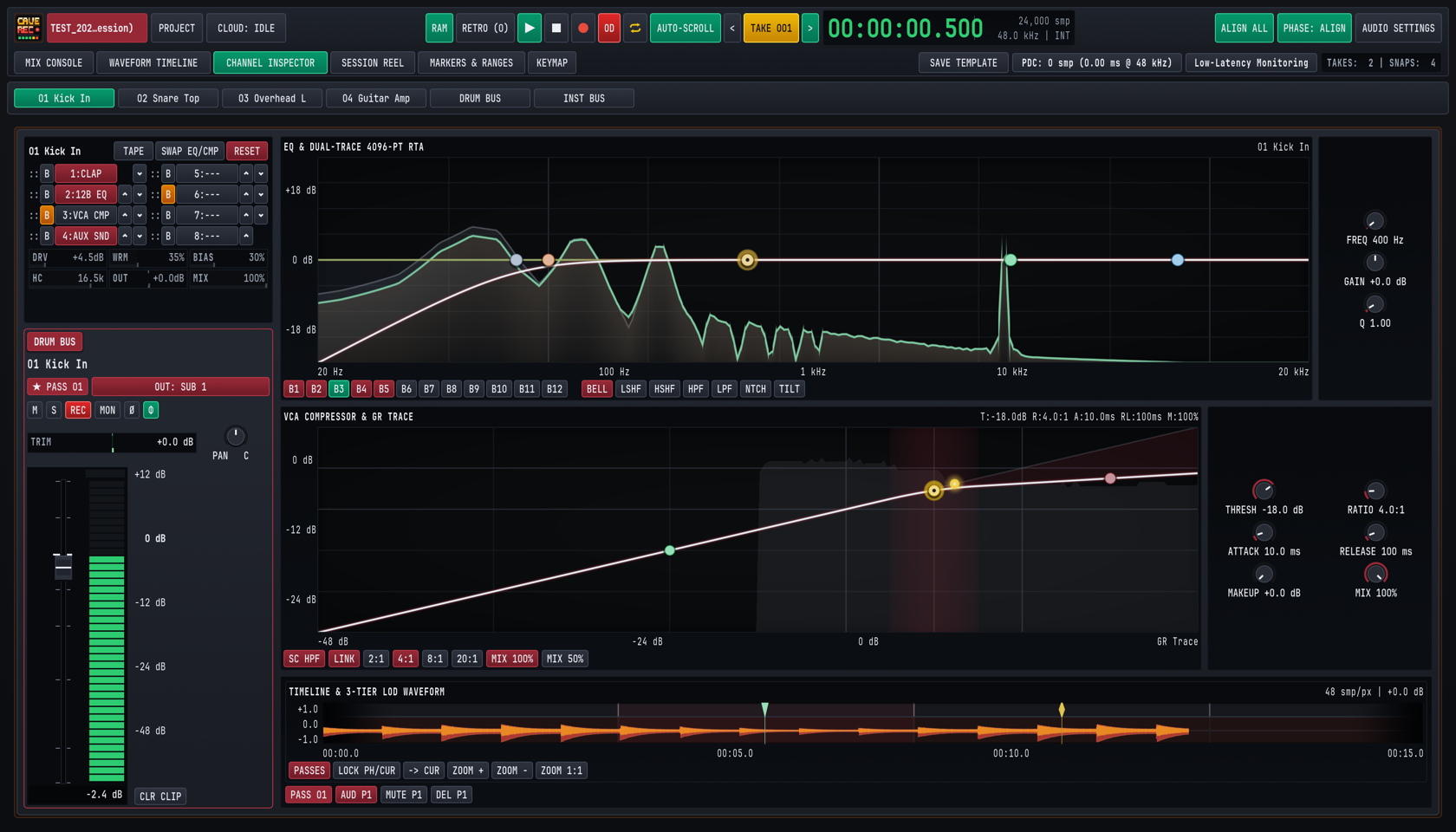
In the CHANNEL INSPECTOR view, the left column anchors a full-height channel strip (complete with active Pass selector * PASS 01 on Input Tracks or STEREO SUBGROUP / SUBGROUP BUS badges on Subgroups, Output Bus selector, M, S, REC, MON, Ø, Φ, TRIM, rotary PAN, full-scale calibrated meter with +12 dB to -48 dB markings, and CLR CLIP), while the main workspace expands:
EQ & DUAL-TRACE 4096-PT RTA: Adds direct band-select buttons for all 12 bands (B1throughB12), all seven filter shape buttons (BELL,LSHF,HSHF,HPF,LPF,NTCH,TILT), and dedicated precision rotary knobs on the right (FREQ,GAIN,Q).VCA COMPRESSOR & GR TRACE: Adds a continuous scrolling Gain Reduction (GR Trace) timeline, extended ratio and parallel blend buttons (SC HPF,LINK,2:1,4:1,8:1,20:1,MIX 100%,MIX 50%), and six dedicated rotary knobs on the right (THRESH,RATIO,ATTACK,RELEASE,MAKEUP,MIX).- Multi-Bus Output Routing Popover: Clicking the green
OUT: MSTor crimsonOUT: SUB 1button in the left inspector strip opens theOUTPUT BUSESpopover ([x] MASTER BUS,[ ] SUB 2: INST BUS), allowing any track or subgroup to feed multiple buses in parallel. - Bottom Track Waveform & Pass Action Bar: Below the compressor graph, the inspector waveform strip provides quick Pass Lane actions for the active
Take:PASSES(or E) expands Pass Lanes,PASS 01selects the active pass,AUD P1auditions that pass in isolation,MUTE P1mutes the pass, andDEL P1deactivates and hides the pass from playback. - Dedicated Inspector Keyboard Shortcuts: While inspecting any strip, press H to toggle the compressor Sidechain High-Pass Filter (
SC HPF), X to clear the channel peak overload latch (CLR CLIP), E to expand or collapse Pass Lanes (PASSES), or SHIFT + M / S / A / I / P to toggle Mute, Solo, Record Arm, Input Monitor, or Polarity (Ø).
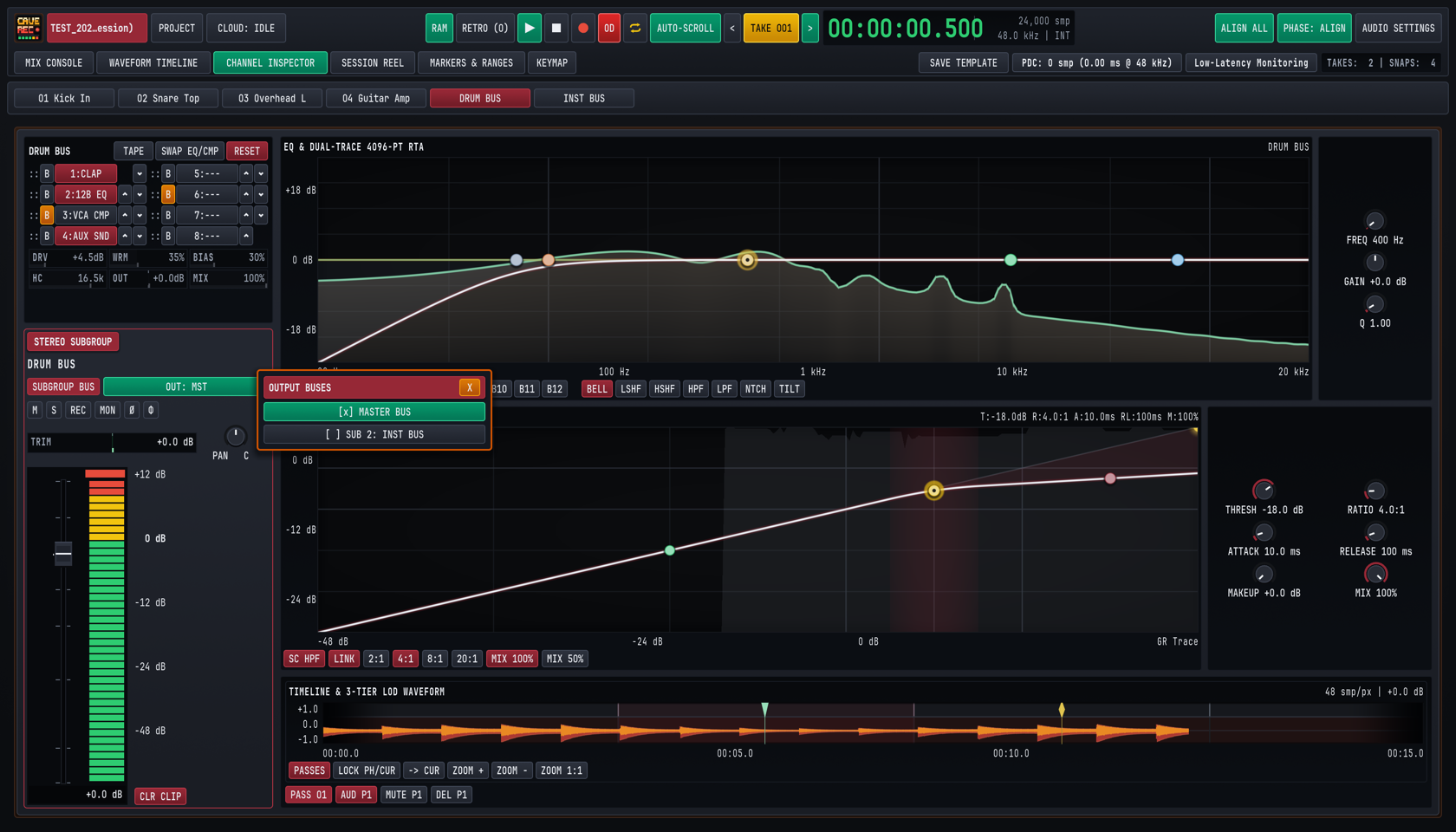
5.1.3 Reordering the 8-Slot Rack, SWAP EQ/CMP & RESET#
In Well 1 (01 Kick In or DRUM BUS), the eight processing slots (1 through 8) execute sequentially from Slot 1 down to Slot 8:
- Clicking a Slot Pill to Assign Built-In Processors: Clicking any slot pill (
1through8) opens the rack slot assignment picker, where you can assign any of the built-in zero-latency studio processors (12-Band Dynamic EQ,VCA Compressor,Tape Saturation, orAux Send Tap) or clear the slot toEmpty / Bypassed(---). - Dragging
::or Clicking^/v: Reorders any processor (1:CLAP,2:12B EQ,3:VCA CMP,4:AUX SND) to an earlier or later slot in real time without audio clicks or dropouts. Moving4:AUX SNDabove3:VCA CMP, for example, taps the channel's Aux Sends before compression even when the send is set to rack-tap mode. SWAP EQ/CMPButton: Instant one-click macro in the top-left rack header that swaps the slot positions of the12B EQandVCA CMPprocessors. UseSWAP EQ/CMPto audition whether filtering low-end mud before the compressor detector (EQ -> CMP) or shaping tonal balance after dynamic peak control (CMP -> EQ) sounds more natural on a vocal, bass, or drum bus.B(Slot Bypass) &RESET: ClickingBnext to any slot (or on the12B EQ/VCA CMPbadge) bypasses that single processor in place (illuminated amber). Clicking the crimsonRESETbutton returns all built-in processors on the selected strip to their flat factory defaults.
5.2 Tape Saturation & Input Drive (TAPE)#
Located in Well 1 beneath the 8-slot rack, the built-in Tape Saturation (TAPE) processor models the non-linear magnetic hysteresis, transformer core warmth, bias asymmetry, and head-bump high-frequency roll-off of a calibrated analog multitrack tape machine running at 15 or 30 IPS.
Click the TAPE pill in the Well 1 header to engage or bypass the tape stage on the selected Input Track or Subgroup Bus.
5.2.1 Tape Saturation Parameter Reference#
| Parameter | UI Label | Range | Default | Acoustic & Signal Effect |
|---|---|---|---|---|
| Input Drive | DRV |
0.0 dB to +24.0 dB |
+4.5 dB |
Pushes signal level into the magnetic saturation transfer curve, smoothly soft-clipping fast transient spikes while increasing harmonic density. |
| Harmonic Warmth | WRM |
0% to 100% |
35% |
Controls the low-mid transformer head-bump and low-order (2nd and 3rd) harmonic enrichment between 80 Hz and 350 Hz. |
| Tape Bias | BIAS |
0% to 100% |
30% |
Adjusts virtual AC bias current. Lower values (10% to 25%) emphasize gritty odd-order harmonics, while higher values (40% to 75%) produce smooth, warm even-order compression. |
| High-Cut Roll-Off | HC |
4.0 kHz to 20.0 kHz |
16.5 kHz |
Simulates analog tape high-frequency self-erasure and smooths out harsh cymbal sizzle, close-mic brass bite, or digital guitar amp fizz. |
| Output Trim | OUT |
-12.0 dB to +12.0 dB |
+0.0 dB |
Compensates for loudness gained from DRV so you can A/B the TAPE button at matched perceived volume. |
| Parallel Wet/Dry Mix | MIX |
0% to 100% |
100% |
Blends the dry uncompressed input signal with the saturated tape path directly inside the processor. |
5.2.2 Studio Tape Recipes for Tracking & Mixing#
| Source Material | DRV |
WRM |
BIAS |
HC |
OUT |
MIX |
Sonic Goal |
|---|---|---|---|---|---|---|---|
Snare Top (02SnrTp) |
+6.5 dB |
40% |
35% |
14.5 kHz |
-2.5 dB |
100% |
Rounds off paper-thin stick transients by 3 dB to 4 dB on the peak meter while thickening the 200 Hz shell fundamental. |
| Bass DI Harmonic Weight | +9.0 dB |
65% |
25% |
8.5 kHz |
-4.0 dB |
70% |
Generates audible upper harmonics (200 Hz to 900 Hz) on a clean DI bass so the note pitch cuts through small speakers while keeping 30% clean sub-fundamental via MIX. |
Drum Bus Glue (DRUM BUS) |
+3.5 dB |
35% |
50% |
17.5 kHz |
-1.5 dB |
100% |
Cohesively binds kick, snare, and overheads together and absorbs micro-transients before the signal reaches the Subgroup VCA Compressor. |
| Harsh Guitar Cab Ribbon/SM57 | +4.0 dB |
50% |
60% |
11.0 kHz |
-1.5 dB |
100% |
Softens 4 kHz to 8 kHz pick harshness and adds spongy analog midrange push. |
5.3 12-Band Parametric EQ & Dual-Trace Spectrum Analyzer (EQ & RTA)#
Each Input Track and Subgroup Bus features a precision 12-Band Parametric Equalizer (2:12B EQ) paired with a Dual-Trace High-Resolution Real-Time Spectrum Analyzer (EQ & DUAL-TRACE 4096-PT RTA). Designed for zero-zipper-noise live adjustment, the equalizer handles everything from steep sub-bass rumble filtering and surgical snare-ring notch removal to broad, musical spectral tilt shaping.
5.3.1 12-Band EQ Parameter & Filter Shape Reference#
| Control / Filter Shape | UI Badge / Knob | Range / Behavior | Default | Studio Application |
|---|---|---|---|---|
| Band Selectors | B1 .. B12 |
12 independent bands | B1..B5 active |
Selects which band (B1 through B12) is bound to the filter shape pills and right-hand rotary knobs (FREQ, GAIN, Q). |
| Bell (Peaking) | BELL |
Proportional-Q peaking/dipping | Default on mid bands | Boosts or cuts a targeted frequency band around FREQ with bandwidth controlled by Q. |
| Low Shelf | LSHF |
Shelving below corner FREQ |
Band B2 |
Boosts or attenuates all frequencies below FREQ (e.g., adding 80 Hz kick weight or thinning muddy acoustic guitar low-mids). |
| High Shelf | HSHF |
Shelving above corner FREQ |
Band B5 |
Adds 10 kHz vocal and overhead air or shelves down overly bright cymbal bleed. |
| High-Pass Filter (Low-Cut) | HPF |
Steep low-cut below FREQ |
Band B1 |
Removes stage floor rumble, air-conditioning hum, and plosive energy from vocals, guitars, and overheads. |
| Low-Pass Filter (High-Cut) | LPF |
Steep high-cut above FREQ |
Optional | Rolls off ultrasonic hiss, guitar amp buzz above 7 kHz, or hi-hat bleed in kick and tom microphones. |
| Surgical Notch | NTCH |
Deep narrow band-reject | Optional | Eliminates annoying metallic snare drum overtones, acoustic guitar body wolf notes, or 50 Hz/60 Hz mains hum without dulling adjacent frequencies. |
| Spectral Tilt | TILT |
Linear dB/octave fulcrum tilt | Optional | Pivots the entire frequency spectrum around FREQ (default 1 kHz). Positive gain brightens highs while simultaneously attenuating lows, and negative gain warms lows while softening highs. |
| Center / Corner Frequency | FREQ |
20.0 Hz to 20,000 Hz |
Band-dependent | Sets the target frequency for the selected band (B1..B12). |
| Band Gain | GAIN |
-24.0 dB to +24.0 dB |
+0.0 dB |
Sets boost or attenuation depth for BELL, LSHF, HSHF, and TILT shapes (plotted against -18 dB, 0 dB, and +18 dB horizontal reference lines). |
| Bandwidth / Resonance | Q |
0.10 (wide) to 18.00 (narrow) |
1.00 |
Controls filter sharpness on BELL/NTCH bands or corner resonance/slope steepness on HPF, LPF, LSHF, and HSHF. |
5.3.2 Operating Interactive EQ Nodes & Reading the Dual-Trace RTA#
You can shape EQ either via the right-hand rotary knobs (FREQ, GAIN, Q) in the CHANNEL INSPECTOR view (CMD/CTRL + 3) or by manipulating the colored band nodes directly inside the EQ & RTA graph on both the Mix Console and Channel Inspector:
- Click + Drag Node Horizontally / Vertically: Sweeps
FREQ(20 Hzto20 kHz) andGAIN(-24.0 dBto+24.0 dB) simultaneously. - Mouse Scroll Wheel (or SHIFT + Vertical Drag) Over a Node: Narrows or widens the filter
Q(0.10to18.00). - SHIFT + Drag Node: Engages
10xfine precision (0.1 dBgain steps and sub-Hz frequency resolution) for locking onto exact room resonances. - Double-Click Node (or OPT/ALT + Click): Resets the band's
GAINto0.0 dB.
Behind the white composite EQ curve, the Dual-Trace High-Resolution Real-Time Spectrum Analyzer (4096-PT RTA) renders two live acoustic traces simultaneously:
- Pre-EQ Input Spectrum (Darker Shaded Trace): Shows the raw frequency energy entering the
12B EQslot. - Post-EQ Output Spectrum (Bright Emerald Trace): Shows the resulting frequency energy leaving the
12B EQslot after all active bands are applied.
Because the high-resolution analyzer resolves narrow intervals down into the lowest bass octaves (20 Hz to 250 Hz), you can visually distinguish between the 55 Hz fundamental of a kick drum and the 82 Hz low E string of a bass guitar, place a narrow BELL or NTCH node directly on a ringing 480 Hz snare overtone spike, and watch the emerald post-EQ trace flatten out in real time. On any record-armed track (R), the Dual-Trace RTA remains active even when software Input Monitoring (I) is turned off, allowing you to inspect live microphone spectrum and dial in high-pass or notch filters during zero-latency hardware direct-monitoring sessions.
5.4 Analog VCA Compressor & Gain Reduction Meter (VCA COMPRESSOR & GR)#
The Analog VCA Compressor (3:VCA CMP) models a classic studio voltage-controlled amplifier dynamics processor (inspired by large-format British console bus compressors and fast American VCA limiters). It combines punchy transient control with a built-in Sidechain High-Pass Filter (SC HPF, shortcut H in the Channel Inspector) and New York Parallel Mix (MIX) stage.
5.4.1 VCA Compressor Parameter Reference#
| Parameter / Switch | UI Label | Range / Presets | Default | Studio Function |
|---|---|---|---|---|
| Threshold | THRESH |
-60.0 dB to 0.0 dB |
-18.0 dB |
Sets the input level (dBFS) above which gain reduction begins. Drag the yellow threshold node directly on the transfer graph or turn the THRESH knob. |
| Ratio | RATIO (2:1, 4:1, 8:1, 20:1) |
1.0:1 to 20.0:1 |
4.0:1 |
Determines how strongly signal excursions above THRESH are attenuated. Use the quick-ratio buttons (2:1 gentle leveling, 4:1 studio punch, 8:1 aggressive control, 20:1 peak limiting) or sweep continuously with the RATIO knob. |
| Attack Time | ATTACK |
0.1 ms to 100.0 ms |
10.0 ms |
Controls how quickly the VCA gain cell clamps down once a transient crosses THRESH. Slow attacks (15 ms to 35 ms) let drum stick snap pass through uncompressed, while fast attacks (0.5 ms to 3 ms) tame sharp peaks. |
| Release Time | RELEASE |
10.0 ms to 1000.0 ms |
100.0 ms |
Controls how fast gain recovers to 0.0 dB after the signal drops below THRESH. Set release so gain reduction recovers smoothly in time with the song's tempo without audible pumping. |
| Makeup Gain | MAKEUP |
0.0 dB to +24.0 dB |
+0.0 dB |
Restores output level to match the uncompressed peak or perceived loudness. |
| Parallel Wet/Dry Mix | MIX (MIX 100%, MIX 50%) |
0% to 100% |
100% |
Blends the uncompressed dry signal with the compressed VCA output. Click MIX 50% for instant 50/50 New York-style parallel compression. |
| Sidechain High-Pass | SC HPF (H in Inspector) |
Off / Active (crimson, 90 Hz HPF) |
Active on drums/bus | Inserts a 90 Hz high-pass filter into the compressor's detector circuit so heavy kick drum sub-bass energy does not trigger excessive gain reduction across the rest of the frequency spectrum. |
| Stereo Sidechain Link | LINK |
Off / Linked (crimson) | Linked | Links left and right level detectors on stereo channels and Subgroup Buses so both channels compress identically and preserve stereo imaging. |
5.4.2 Interactive Transfer Curve & Real-Time Gain Reduction (GR) Trace#
The VCA COMPRESSOR & GR graph displays input level (-48 dB to 0 dB) on the horizontal axis against output level (-24 dB to 0 dB) on the vertical axis:
- Interactive Threshold & Knee Nodes: Drag the highlighted gold node along the diagonal line to set
THRESH, and drag the upper slope handle (or click2:1,4:1,8:1,20:1) to tilt the compression ratio above threshold. - Scrolling Gain Reduction (
GR Trace): As audio passes through the compressor, a shaded crimson trace sweeps across the graph showing instantaneous and historical gain reduction depth in decibels. Watching theGR Tracealongside the waveform makes it easy to dialATTACKandRELEASEso the compressor breathes cleanly between snare hits or vocal phrases.
5.4.3 Studio Starting Settings for Common Sources#
| Source / Bus | RATIO |
ATTACK |
RELEASE |
SC HPF |
MIX |
Target GR |
Why It Works |
|---|---|---|---|---|---|---|---|
| Kick In & Snare Top | 4:1 |
18.0 ms |
80.0 ms |
Off | 100% |
-3 to -6 dB |
The 18 ms attack lets the initial beater click and stick crack pass through at full impact before clamping the drum decay, adding punch and tightening sustain. |
| Bass Guitar (DI or Amp) | 4:1 or 8:1 |
12.0 ms |
140.0 ms |
On (SC HPF) |
80% |
-4 to -7 dB |
Engaging SC HPF prevents the low E (41 Hz) and B (31 Hz) strings from over-triggering the VCA cell, keeping low and high notes at equal volume across the fretboard. |
| Lead & Backing Vocals | 2:1 or 4:1 |
6.0 ms |
120.0 ms |
On (SC HPF) |
100% |
-3 to -5 dB |
Catches loud chorus phrases smoothly while keeping intimate verses intelligible above the band without requiring constant fader riding. |
Drum Bus (DRUM BUS) Parallel Crush |
8:1 or 20:1 |
10.0 ms |
75.0 ms |
On (SC HPF) |
50% (MIX 50%) |
-8 to -12 dB |
Heavy compression brings up room ambience and snare sustain, while MIX 50% retains 100% of the dry, natural drum transients in parallel. |
5.5 Stereo Convolution Reverb (AUX 1 REVERB) & Stereo Tape Delay (AUX 2 TAPE DLY)#
To keep CPU overhead near zero while providing authentic vintage studio ambience during live tracking and mixing, Cave Recorder provides two dedicated stereo Aux Return processors fed by the RVB and DLY send bars on every Input Track and Subgroup Bus.
5.5.1 AUX 1 REVERB: Zero-Latency Acoustic Convolution Reverb#
AUX 1 REVERB uses a zero-latency real-time acoustic convolution engine (FFT CONV IR / ZERO-LATENCY) loaded with studio impulse responses, headed by the classic EMT 140 Plate alongside Studio Wood Room, Live Stone Chamber, and Vintage Spring Tank spaces.
| Parameter | UI Label | Range | Default | Studio Function |
|---|---|---|---|---|
| Acoustic Space / IR | Header Model Name | EMT 140 Plate, Studio Room, Chamber, Spring |
EMT 140 Plate |
Selects the acoustic impulse response profile loaded into the stereo convolution engine. |
| Input Low-Cut Filter | LC (LC 90Hz) |
20 Hz to 1000 Hz |
90 Hz |
Filters low-frequency rumble and kick/bass bleed out of the reverb input so the reverb tail stays airy and never muddies the low end of the mix. |
| Pre-Delay | PD |
0 ms to 200 ms |
18 ms |
Inserts a short clean gap before the reverb tail begins. Setting PD between 18 ms and 45 ms preserves upfront dry vocal clarity while creating the illusion of a larger room (the Haas effect). |
| Decay Time | DCY |
0.20 s to 12.00 s |
2.40 s |
Scales the RT60 reverberation decay envelope (0.8 s to 1.4 s for tight drum rooms, 1.8 s to 2.8 s for classic vocal/snare plates, 3.5 s+ for ambient ballads) and dynamically rebuilds and hot-swaps the stereo studio plate impulse response in real time. |
| Wet Level Toggle | WET (WET 100%) |
100% Full Wet / 50% Blend |
100% (crimson) |
Toggles the return strip between 100% pure wet bus operation and 50% attenuated wet level while keeping AUX 1 REVERB solo-safe. |
5.5.2 AUX 2 TAPE DLY: Capstan Analog Tape Delay#
AUX 2 TAPE DLY models a multi-head magnetic capstan tape echo unit (CAPSTAN TAPE / TAPE ECHO) complete with mechanical transport wow and flutter, oxide saturation, high-frequency head damping, and stereo ping-pong regeneration.
| Parameter | UI Label | Range | Default | Studio Function |
|---|---|---|---|---|
| Capstan Wow & Flutter | WOW (WOW 18%) |
0% to 100% |
18% |
Introduces organic capstan motor speed drift and subtle pitch modulation on echoes, widening vocals and guitar leads without synthetic chorus artifacts. |
| High-Frequency Damping | DMP (DMP 4.2k) |
500 Hz to 20.0 kHz |
4.2 kHz |
Places a warm analog low-pass filter inside the feedback loop so each successive echo repeat becomes progressively darker and tucks neatly behind the dry performance. |
| Delay Time | TM |
1 ms to 2000 ms |
320 ms |
Sets the echo interval between 10 ms doubling, 75 ms to 115 ms rockabilly/vocal slapback, and 250 ms to 600 ms rhythmic quarter-note or dotted-eighth throws. |
| Feedback Regeneration | FB |
0% to 95% drag bar (98% max) |
35% |
Controls how much delayed output is fed back into the virtual record head (0% for a single slapback repeat, 25% to 45% for natural fading trails, and up to 95%/98% for sustained dub tape repeats without runaway clipping). |
| Ping-Pong Width & Toggle | PP (PP 60%) |
Off / Active (0% to 100% width) |
Active (60%) |
Alternates echo repeats between the left and right channels at the selected stereo spread width (PP 60%) while keeping AUX 2 TAPE DLY solo-safe. |
5.6 Automatic Multi-Mic Phase & Polarity Alignment (ALIGN ALL & Φ)#
When recording a drum kit, guitar cabinet, acoustic piano, or horn section with multiple microphones, physical distance differences between capsules create acoustic arrival-time offsets. Sound travels through studio air at approximately 343 meters per second (1,125 feet per second), meaning every 34.3 cm (13.5 inches) of extra distance between a close microphone and an overhead or room microphone delays the acoustic wavefront by 1.0 millisecond (1000 microseconds, or 48 samples at 48.0 kHz).
5.6.1 Why Multi-Mic Time Offsets Cause Comb Filtering & Hollow Low End#
When two microphones capture the same instrument at slightly different arrival times and are summed together on DRUM BUS or MST MASTER BUS:
- Frequencies whose half-wavelength matches the time offset arrive
180°out of phase and cancel each other out, carving deep, hollow notches across the frequency spectrum (known as comb filtering). - A snare drum captured by both
02SnrTp(close dynamic mic) and03OvrhdL(condenser mic63 cm/25 inchesabove the snare) suffers a1.85 ms(1850 us) arrival delay at the overhead capsule. Without phase alignment, summing the overheads with the close snare mic thins out the200 Hzsnare body and smears the initial stick transient into a double flam. - Similarly, a snare bottom microphone pointed upward at the snare wires moves in the opposite mechanical direction from the top snare microphone, requiring a
180°polarity inversion (Ø) in addition to time alignment.
5.6.2 Running ALIGN ALL & Auditioning with PHASE: ALIGN / PHASE A/B#
Cave Recorder eliminates manual waveform sliding and guesswork through its built-in Sub-Sample Multi-Mic Phase & Polarity Alignment engine:
- Record a Short Pass or Play Back an Existing Take: Have the drummer play the full kit for a few bars (or load any recorded
Takeon the timeline). - Click
ALIGN ALLin the Top Deck (orΦ ALIGN ALLon the Console Bar): Cave Recorder analyzes the activeTake's recorded multi-track Broadcast Wave.wavfiles on disk (or the live rolling capture memory if no recordedTakefiles exist yet) using sub-sample bandpass (150 Hzto6 kHz) GCC-PHAT cross-correlation within a+-25 msacoustic window, delaying closer microphones forward in time to match the furthest reference microphone. The entire multi-track phase and polarity alignment operation is captured as a single undoable step so you can revert or reapply it at any time with CMD/CTRL + Z. - Inspect Per-Channel
ØandΦReadouts: Within milliseconds, each aligned channel strip updates its header telemetry and phase buttons:Ø(Cyan Polarity Badge, SHIFT + P on inspected strip): Engages automatically on any channel whose acoustic waveform is inverted180°relative to the reference microphone (such asCH02 02SnrTpor a bottom snare mic).Φ(Emerald Phase Align Badge) & Microsecond Readout: Engages sub-sample time alignment (0.00 msto+50.00 ms, displayed in microseconds from0usto50000us, such as420usonCH02and1850usonCH03) so all wavefronts arrive at the subgroup summing bus at the exact same sub-sample instant.
- A/B Audition Globally (
PHASE: ALIGN/PHASE A/B): Click the emeraldPHASE: ALIGNbutton in the Top Deck (or thePHASE A/Bbutton on the Mix Console toolbar) to toggle all phase and polarity corrections in and out across the entire console simultaneously. You will immediately hear the kick and snare low-end punch tighten up and the stereo center image snap into focus. BothRun Multi-Mic Phase AlignmentandToggle Global Phase A/Bcan also be bound to custom keyboard shortcuts in theKEYMAPview (CMD/CTRL + 6).
5.7 Hosting External CLAP Audio Plugins (1:CLAP, PDC & Low-Latency Monitoring)#
While Cave Recorder's built-in TAPE, 12B EQ, VCA CMP, AUX 1 REVERB, and AUX 2 TAPE DLY processors cover 95% of studio tracking and mixing tasks with zero added latency, any of the eight insert slots (Slots 1..8) on any Input Track or Subgroup Bus can also host third-party CLAP (Clever Audio Plug-in, .clap) effects processors.
5.7.1 Scanning & Loading .clap Plugins into the 8-Slot Rack#
Cave Recorder automatically scans the standard operating system CLAP plugin directories on startup:
- macOS:
/Library/Audio/Plug-Ins/CLAPand~/Library/Audio/Plug-Ins/CLAP - Windows:
C:\Program Files\Common Files\CLAPand%LOCALAPPDATA%\Programs\Common\CLAP - Linux:
~/.clapand/usr/lib/clap
To manage slots and CLAP plugin processing on an Input Track or Subgroup Bus:
- Select the target track or click
SELon the target Subgroup Bus, then look at the 8-slot rack in Upper Well 1 (CMD/CTRL + 1) or the left column ofCHANNEL INSPECTOR(CMD/CTRL + 3). - Click any slot (
1through8) to open the slot assignment picker for built-in zero-latency processors (12-Band Dynamic EQ,VCA Compressor,Tape Saturation,Aux Send Tap, orEmpty / Bypassed), or click an active1:CLAPslot pill to inspect the hosted plugin. (Note: Interactive per-slot selection of third-party external.clapplugins from the rack picker is scheduled for a post-v0.1.0release with a dedicated Plugin Manager.) - Use the slot's
::drag handle or^/varrows to position the1:CLAPslot anywhere in the signal chain (for example, placing1:CLAPahead of2:12B EQand3:VCA CMP). - Click the slot's
Bbutton at any time to bypass the slot in place.
5.7.2 Automatic Plugin Delay Compensation (PDC) & Transparency Breakdown#
All built-in Cave Recorder processors (TAPE, 12B EQ, VCA CMP, AUX 1 REVERB, AUX 2 TAPE DLY) operate with zero internal sample latency (0 smp / 0.00 ms). However, when you insert a third-party CLAP plugin that uses internal lookahead buffering (such as linear-phase equalizers or lookahead limiters), that plugin reports its processing delay (in samples) to Cave Recorder.
To prevent phase cancellation or timing drift between parallel tracks and subgroups, Cave Recorder performs Automatic Plugin Delay Compensation (PDC) across the entire mixing graph:
- The Top Deck displays a live
PDC: N smp (X.XX ms @ 48 kHz)status pill at all times. - Clicking the
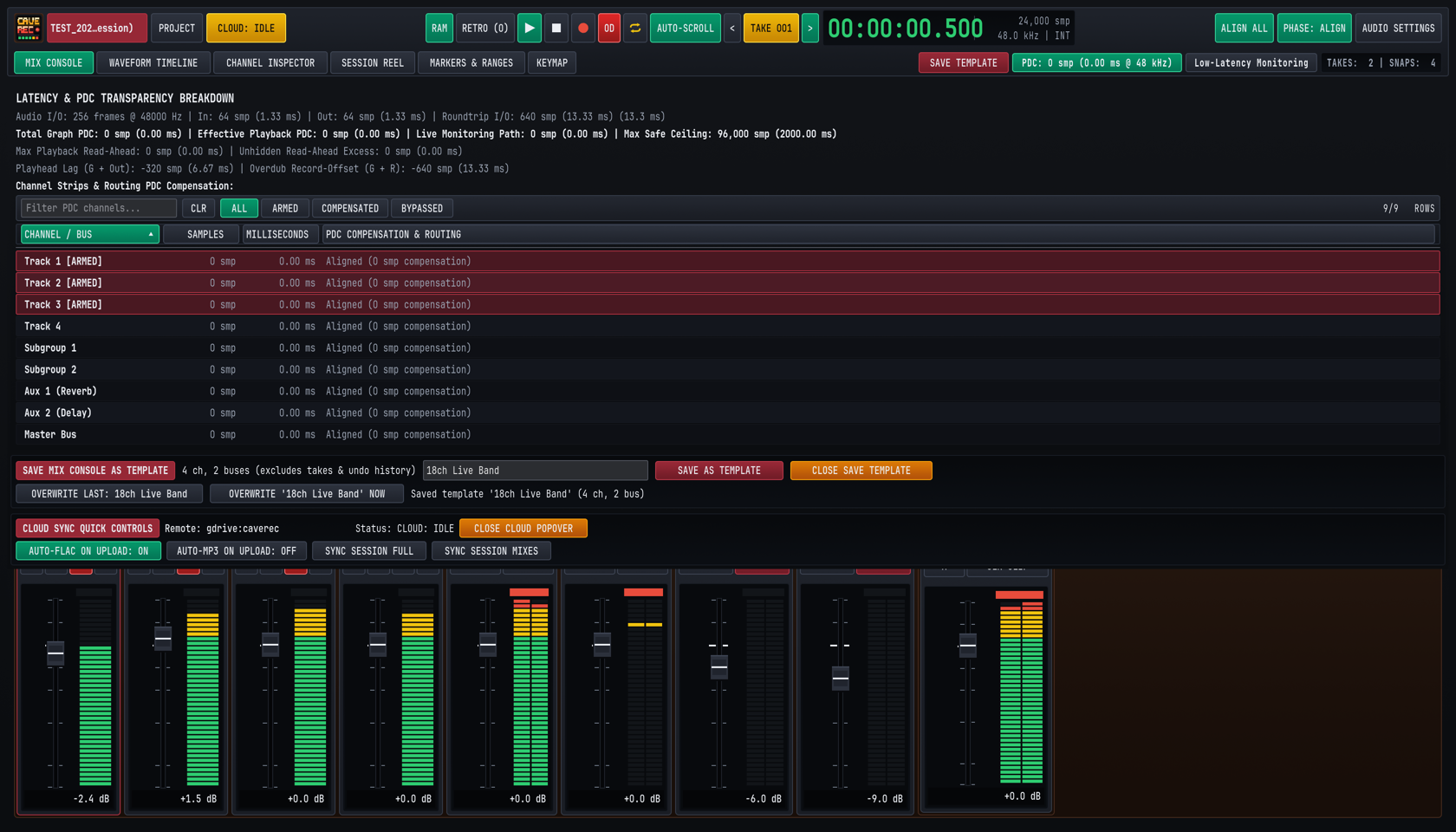
PDCpill in the Top Deck opens the Latency & PDC Transparency Breakdown popover (shown in Figure 5.4 above), which reports every latency stage in your studio system in both Samples (smp) and Milliseconds (ms):Audio I/O: Current hardware buffer size (256 frames @ 48000 Hz), input buffer latency (In: 64 smp / 1.33 ms), output buffer latency (Out: 64 smp / 1.33 ms), and calibrated hardwareRoundtrip I/O(640 smp / 13.33 ms).Total Graph PDC&Effective Playback PDC: Total delay compensation applied across parallel tracks and buses (Max Safe Ceiling: 96,000 smp / 2000.00 ms).Playhead Lag&Overdub Record-Offset: Exact negative sample offset (-640 smp / 13.33 ms) applied automatically when writing new Overdub Passes (Rec002-OD) to disk so that everything a musician plays against playback lands sample-accurately on the timeline.- Filterable Per-Channel Table (
ALL,ARMED,COMPENSATED,BYPASSED): Lists every Input Track (Track 1 [ARMED]..Track 18),Subgroup 1..2,Aux 1 (Reverb),Aux 2 (Delay), andMaster Buswith its individual sample and millisecond compensation state.
5.7.3 Low-Latency Monitoring During Overdubs#
When you are late in a mix and have inserted a high-latency lookahead mastering plugin or linear-phase EQ on a track or Subgroup Bus, recording a last-minute vocal or guitar overdub through that high-latency plugin would introduce a distracting echo in the musician's headphones.
Clicking Low-Latency Monitoring in the Top Deck solves this immediately:
- Cave Recorder temporarily bypasses high-latency CLAP plugins only on record-armed (
R) live monitoring paths and their downstream buses, dropping the musician's headphone monitoring latency back down to pure zero-latency built-in console processing (0 smpgraph PDC). - All unarmed playback tracks continue playing with full Plugin Delay Compensation.
- As soon as you finish recording the Overdub Pass and disarm the track (or toggle
Low-Latency Monitoringoff in the Top Deck), the high-latency CLAP plugins re-engage automatically without losing a single plugin parameter setting.